
Compliance training with a live training matrix
Continuum Learn is a compliance training LMS. Tell it which learners must complete a course and how often: it enrols them, chases them before and after the due date, reopens the course when a refresher is due, issues a fresh certificate each time and shows who is compliant in one matrix.
Completions, due dates, expiries and certificates are recorded by the LMS as learners finish the course.
- Renew every N months or on a fixed date
- Reminders at 08:00 in your time zone
- CSV export for auditors
What is compliance training software with a training matrix?
A training matrix shows who has completed which required training and when it expires. Continuum Learn builds it for you: you set a training requirement (one course, who must take it and how often it repeats), and the LMS enrols those learners, sends reminders, reopens the course when a refresher is due and records every completion, due date, expiry and certificate in a live matrix under Manage > Compliance.
Most organisations start with a spreadsheet: people down the side, courses across the top and a date in every cell. It works until the renewals pile up and somebody has to chase them by hand. If that is where you are, our free training matrix template is a good start. When the spreadsheet stops keeping up, Continuum keeps the same matrix from the training itself, so it never goes out of date.
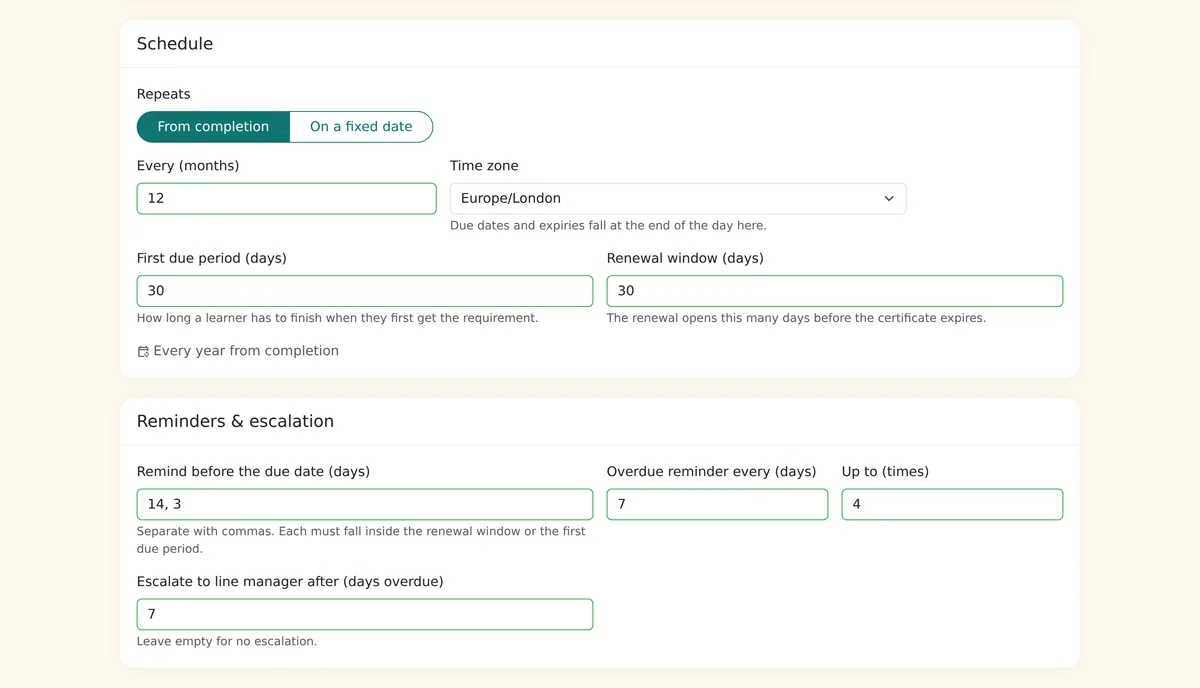
Each run through the course is a cycle with its own due date, completion date, expiry date and numbered certificate. Renewal means taking the same course again: earlier progress is archived rather than deleted, quizzes and assessor sign-off are asked again, and the new certificate supersedes the old one. Certificates can also be issued as verifiable digital badges and grouped into programmes.
Step-by-step guide: how to set up recurring compliance training in Continuum Learn
Built and hosted in the UK, with every feature on every plan
See recurring training in Continuum Learn
Screens from Continuum Learn, shown with example data.
One matrix for every requirement
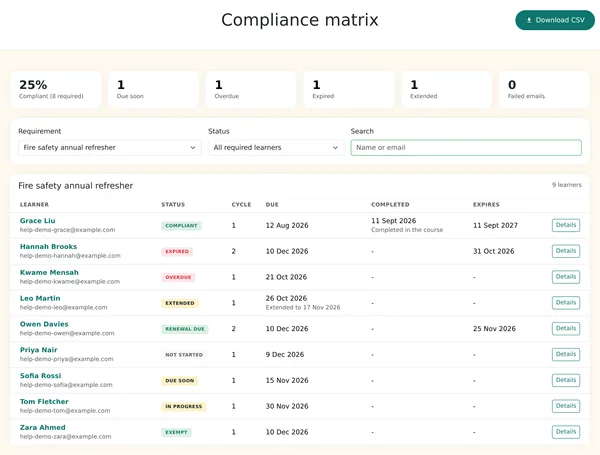
Status tiles across the top, then every learner with their status, cycle, due date, completion date and expiry. Filter, search or download the CSV.
Set the schedule once
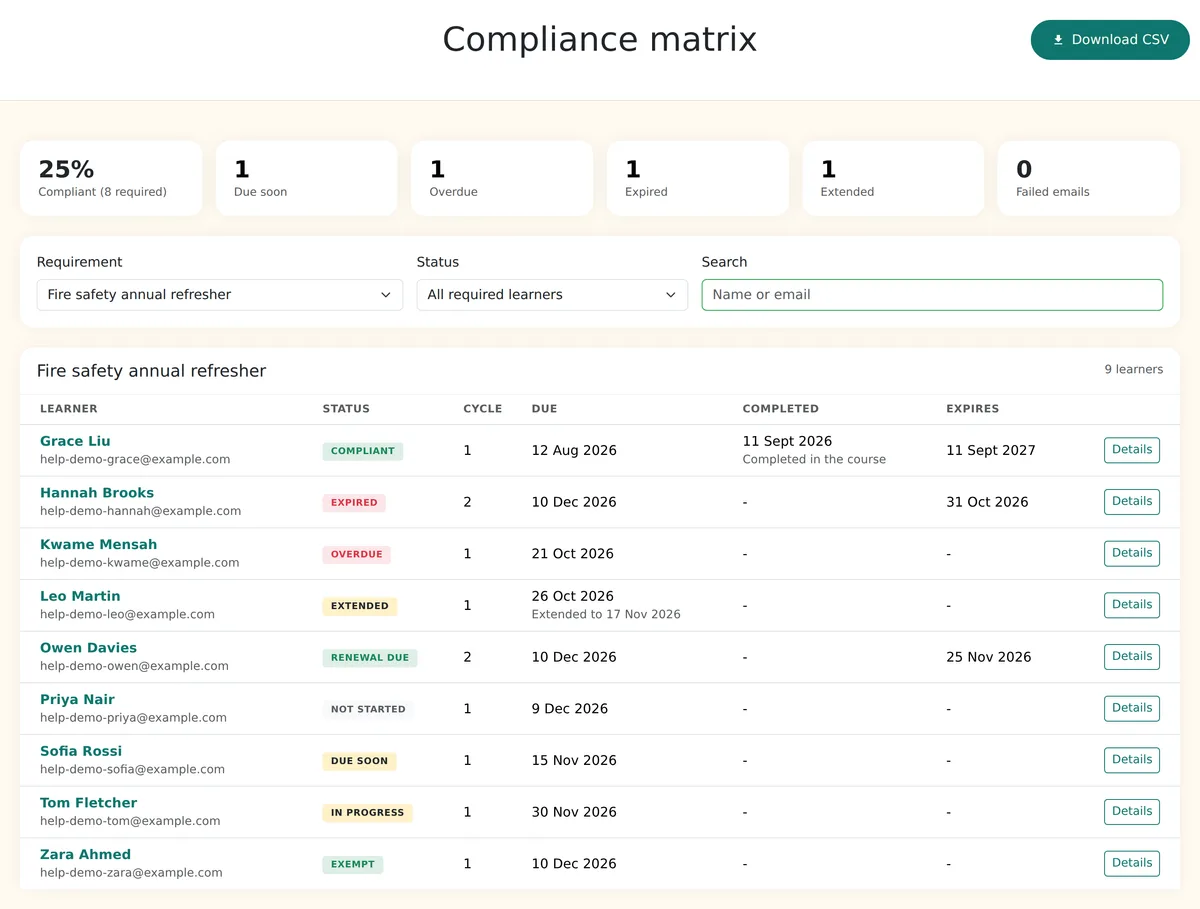
Repeat every 12 months from completion or on a fixed date, set the first due period and renewal window, and choose when reminders and escalation go out.
Every cycle on record
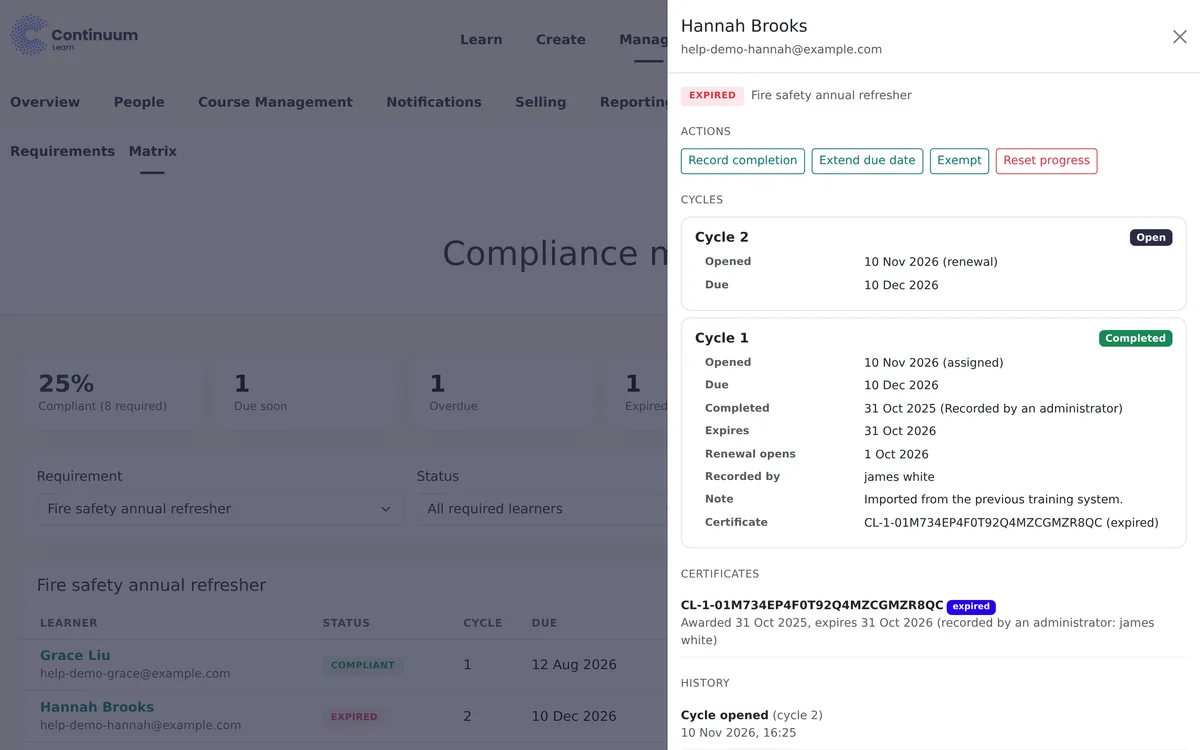
Open a learner to see each cycle with its dates and certificate, the history of what happened, and actions such as extend, exempt or record completion.
What learners see
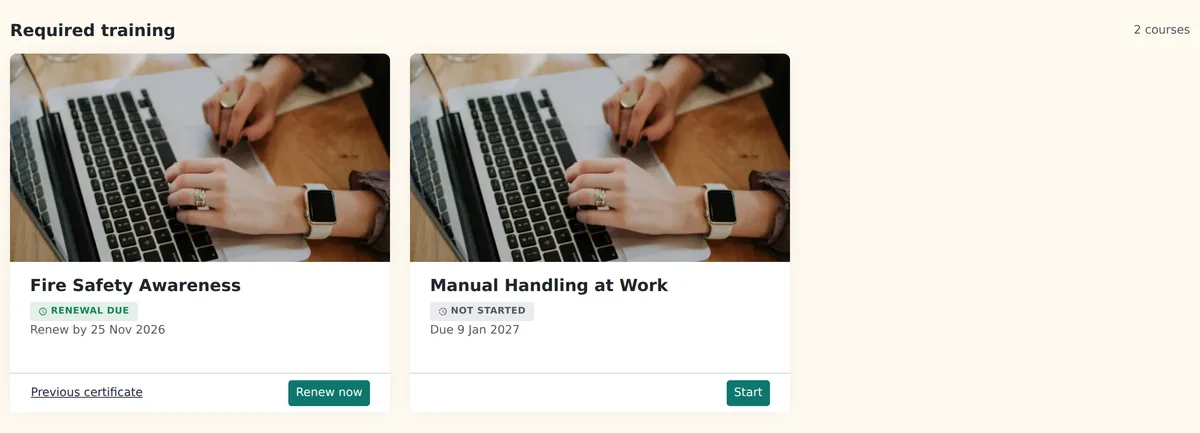
A Required training section opens the learner dashboard, with each course's status and date, so nobody has to dig for what is due.
Why move the training matrix into your LMS
The matrix updates itself, because it is built from the training learners actually complete.
Renewals Open on Their Own
Choose a number of months from each learner's completion, or a fixed day every 1 to 5 years for membership years and annual deadlines. The course reopens before the expiry date.
Chasing Done for You
Learners are emailed when they get the requirement, before the due date, when overdue and when a renewal opens. Defaults are 14 and 3 days before, then weekly when overdue, up to four times.
Line Managers in the Loop
Managers see their reports' required training under My team, send a reminder, and get one email when someone is overdue past your escalation point.
A Certificate Every Cycle
Each completed cycle gets its own numbered certificate with the expiry date printed on it, and the new one supersedes the last.
Who uses recurring compliance training
Annual Refreshers
Fire safety, safeguarding, data protection, manual handling: any course staff or volunteers must repeat every year or every few years.
Membership-Year Revalidation
Professional bodies that need every member to complete a course by the same date each year. See an LMS for professional bodies.
CPD Renewals
Short courses that keep a credential current, with an expiry on the certificate and reminders before it lapses. See CPD certificate software.
Everything in recurring training
Set up under Manage > Compliance by a team admin
Audience by Group
Apply a requirement to all learners or to chosen groups. People who join or leave a group are picked up automatically.
Impact Preview
Before activating, see how many learners would be enrolled, are already compliant, would be reset and would be emailed, with a CSV of who.
Existing Completions Carried Over
Learners who already finished the course are counted as compliant from their completion date, not made to start again.
The Compliance Matrix
Tiles for compliant, due soon, overdue, expired and extended, a learner table with cycle and dates, filters, search, and a CSV of the training records for auditors.
Extensions and Exemptions
Extend a learner's due date, exempt them (optionally until a date) or record training done elsewhere. Every action needs a reason and is logged.
Pause Without Losing Anything
Pause a requirement to stop enrolments, renewals and emails. Learners keep their cycles, and renewals that fell due open with a fresh date when you unpause.
Spreadsheet training matrix or LMS training matrix
Frequently asked questions
What is training matrix software?
Training matrix software keeps the grid of people against required training for you, built from the training itself, instead of a spreadsheet that someone updates by hand. Continuum Learn does this as part of the LMS: learners take the course in Continuum, and every completion, due date, expiry and certificate appears in the compliance matrix under Manage > Compliance.
Can Continuum Learn replace a spreadsheet training matrix?
For training you deliver as Continuum courses, yes: the matrix fills itself as learners complete, and reminders and renewals run automatically. Training done elsewhere can be recorded against a learner by an admin with its date, so it still counts. A sensible way in is to move one requirement across first, run the impact preview, and keep the spreadsheet until the matrix matches it.
How does refresher training work in Continuum Learn?
A training requirement repeats either a number of months after each learner's completion or on a fixed date every 1 to 5 years. Before the expiry date the course reopens for that learner, their earlier progress is archived, and they take the course again, including any quiz or assessor sign-off. Each completed cycle issues a new numbered certificate.
Can I record training that was done somewhere else?
Yes. From a learner's drawer in the compliance matrix an admin can record a completion with its date and a note, and choose whether to issue a certificate. The action needs a reason and is logged with the admin's name.
Do line managers see their team's compliance?
If line managers are switched on for your team, each manager gets a My team page with their reports' required training, their course results and a Send reminder button. Managers can be emailed when a report is overdue past the number of days you choose.
Does Continuum Learn keep training records for audits?
Yes. Every cycle is kept with its due, completion and expiry dates, how the completion was recorded and the certificate number, and earlier progress is archived rather than deleted when a renewal opens. Download CSV exports the current view of the matrix with each learner's name, email, status, cycle and dates for an auditor.
Stop chasing refresher training by hand
Book a demo and we will set up a requirement on a course of yours, run the impact preview and show you the matrix.