
Put your courses on any website with a snippet
Copy a short piece of code from Continuum Learn and paste it into Wix, Squarespace, Webflow, WordPress or a hand-built page. Visitors see live course cards, upcoming events, buy buttons or a whole guide, and nobody has to build an integration.
Advertise your courses with cards that link to your academy, or show a whole publication inline on your own page.
- Live data, no copying and pasting course details
- Works on any site that accepts a script tag
- Included on every plan
How do I embed my courses on my website?
In Continuum Learn, go to Manage > Settings > Integrations > Website embeds, choose what to show, check the live preview, copy the code and paste it into your website's HTML or embed block. The cards fill themselves from your live catalogue, so a new course or a price change appears on your site without anyone editing the page.
There are two embeds, for two different jobs. Advertise your courses shows course and event cards with an image, title, summary and price, and each card links to the course, the event or checkout on your academy. Show a publication puts a whole guide, handbook or fact sheet on your page, with its sidebar, lessons and navigation, so readers never leave your site.
Courses with progress tracking, quizzes and certificates are not rendered inside another website. Learners sign in and learn on your Continuum academy, on your own domain if you use one. If your site runs WordPress and you want members to sign in once, see the WordPress LMS plugin. To compare every way of connecting Continuum to a website, see LMS website integration.
Step-by-step guide: how to add your courses or a publication to any website
One snippet per item, any website builder, and the content stays in step with your academy
Three steps from Continuum to your page
No developer needed if you can add a block of HTML to your site.
Choose what to show
Pick a course list, a single course, an event list, a single event, a buy button or a publication, then set filters such as folder, language and how many to show.
Check the live preview
The generator shows the real embed with your real courses and prices, exactly as visitors will see it, while you change the options.
Copy and paste the code
Paste the snippet into a Custom HTML, Embed or Code block on your site. The script line is only needed once per page.
See it in the product
Screens from Continuum Learn's demo team. The course titles are demo data.
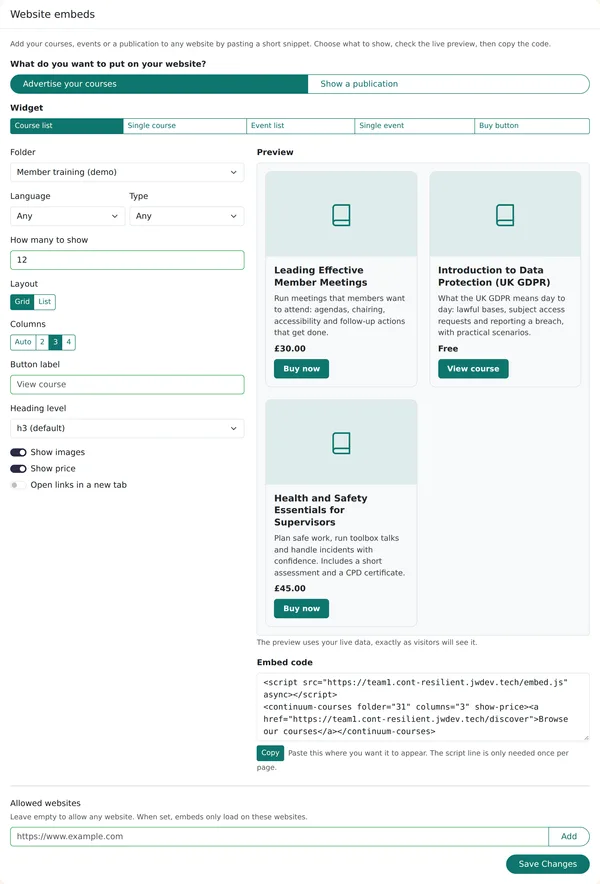
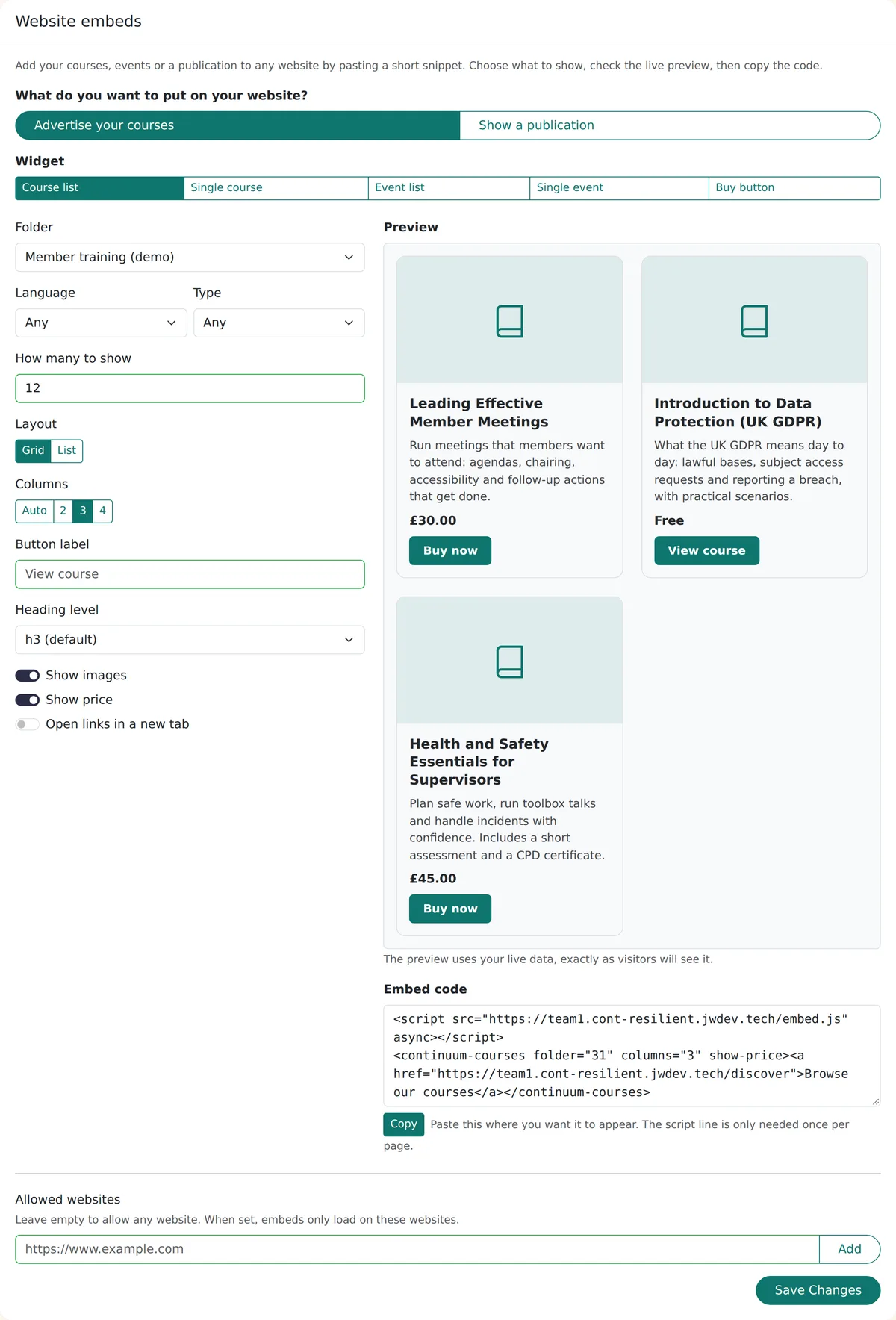
The embed generator
Manage > Settings > Integrations > Website embeds: choose Advertise your courses or Show a publication, set the options, watch the live preview and copy the code.
Why use an embed instead of linking out
Your website keeps the visitor's attention, and the course details are never out of date.
Always up to date
Cards read your live catalogue, refreshed about every five minutes. Publish a course or change a price and the embed follows, with no page to edit.
Any website builder
Wix, Squarespace, Webflow, WordPress, Drupal or a hand-built page: if it lets you add a script tag, the embed works there.
Looks like part of your site
Cards use your website's font and your team's brand colour, and your web team can restyle them with CSS custom properties and ::part().
Keeps itself to itself
Each embed draws inside its own isolated box: it won't restyle your page, and your site's styles won't restyle it. It sets no cookies and does no tracking.
Who uses website embeds
Membership bodies and associations
Show this term's training on the member website, filtered to one folder or language, and send members straight to booking.
Training providers on Wix or Squarespace
Keep the site builder you already use for marketing and add a live course catalogue with buy buttons, without moving to WordPress.
Organisations publishing guidance
Put guides and handbooks on your own pages as navigable content instead of PDF downloads. See Publications on your website.
What the embeds can show
Everything below is in the product today
Course list
A grid or list of public courses, filtered by folder, language or type, with 2 to 4 columns, up to 50 courses, optional price and image, and your own button label.
Single course card
One course, for a featured course in a news story or a landing page. The button goes to checkout when the course is for sale.
Events
Published events as a list or a single card, with the next session date and how many sessions there are. A paid event shows its price, or From the lowest price when there are several tickets (Free if the cheapest ticket is free); a free event shows no price.
Buy buttons
A button for a course, a bundle or an event ticket that opens Continuum checkout, and can send the buyer back to a page on your site afterwards.
Whole publications
A guide or handbook inline on your page, with its sidebar, accordions, carousels, video and flowcharts. Each lesson gets its own shareable address on your site and the Back button works.
Your languages
Button labels and dates are shown in your team's enabled languages: English, Welsh, French, Canadian French, German, Spanish, Italian, Dutch and Portuguese.
Allowed websites
Leave the list empty to let any site show your embeds, or name the websites that may. Publications are opt-in one by one.
Attributable clicks
Every link from an embed carries utm_source=embed and the website's address, so visits and sales from your site show up in your analytics.
A fallback link
Each snippet includes a plain link, so if a visitor's browser blocks the script they still get a way through to your courses.
How LMS website embeds compare
Competitor features checked on vendor documentation in November 2026 and may have changed.
Frequently asked questions
Can I embed my courses on Wix or Squarespace?
Yes. On Wix, add an Embed code block (Embed HTML) and paste the snippet. On Squarespace, add a Code block and paste it there. Some site builders only allow custom code on certain plans, so check yours allows a script tag. The same snippet works on Webflow, Drupal and hand-built pages.
Does it work with WordPress?
Yes. Paste the snippet into a Custom HTML block. If you also want WordPress members to sign in to Continuum without a second login, or prefer shortcodes, use the Continuum Connect plugin instead or as well.
Will it slow my site down?
The loader script is small and loads asynchronously, so the rest of your page does not wait for it. Course data is fetched once per page and cached for about five minutes. A publication loads more, because it brings the guide's own layout and interactive components with it.
Does it affect SEO?
The embed is added by JavaScript. Google renders JavaScript and can read it, but many other search engines and AI crawlers don't, so they see only the fallback link. If search visibility of a guide matters most, show it server-side through the API instead, which puts the text in your page's HTML. The embed is the quick, no-code route; see which route to choose.
Can I limit which websites use my embeds?
Yes. Add your websites to the Allowed websites list in Manage > Settings > Integrations, and embeds will only load on those sites. Leave it empty to allow any website. Publications also have to be switched on one by one before they can be embedded anywhere.
Is it free?
Website embeds are included on every Continuum Learn plan at no extra cost. You need a Continuum team; see pricing.
Can I show a whole guide or handbook on my site?
Yes, if it is a Publication. Turn on "Allow this publication to be embedded on other websites" in the publication's settings, then copy the code. The guide appears inline with its sidebar and lesson navigation, and each lesson gets its own address on your site. Courses with progress, quizzes or certificates stay in your academy.
Can visitors sign in through the embed?
No. Embeds are public and set no cookies. When a visitor clicks through to enrol or buy, they sign in or register on your Continuum academy. For sign-in from your own site, use the WordPress plugin or single sign-on.
Which courses and events appear?
Only courses set to public and events that are published. Drafts, hidden courses and members-only courses do not appear in a course list, and a single-course embed for one of them shows nothing.
Can I change how the cards look?
Yes. Cards take your site's font and your team's brand colour by default. Your web team can override the accent colour, corner radius, font and card background with CSS custom properties, and style individual parts such as the title or button with ::part().
See your courses on your own website
Book a demo and we will generate an embed from your catalogue and show it on a page like yours.