
In short
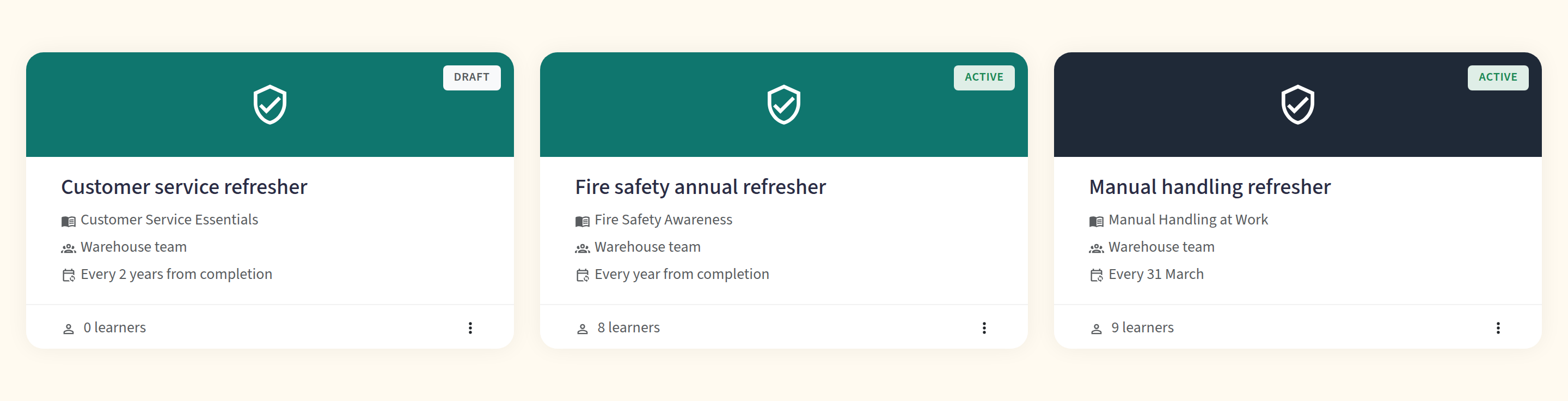
In Continuum Learn, a training requirement makes a group of learners complete a course and renew it on a schedule. It enrols them, sends reminders, reopens the course for renewal, issues a certificate each cycle and shows compliance in a matrix with CSV export.
Still deciding? See what Compliance Training in Continuum Learn can do for your organisation.
A training requirement says "these learners must complete this course, and complete it again every so often". Use it for annual refreshers (fire safety, safeguarding, data protection), for membership-year revalidation, or for any course where you need to show who is up to date.
Continuum does the chasing for you. It enrols the learners, emails them before and after the due date, reopens the course when a renewal is due, issues a fresh certificate each time, and shows you a compliance matrix you can export.
Who can do this: team admins, under Manage > Compliance. If you can't see Compliance in Manage, recurring training isn't switched on for your team yet. Ask support.
Key ideas
- A requirement is one course plus a rule. Each course can have one requirement. The rule covers who it applies to, how often it repeats, and when learners are reminded.
- Each run through the course is a cycle. Cycle 1 is the first completion, cycle 2 is the first renewal, and so on. Every cycle has its own due date, completion date, expiry date and certificate.
- Renewal means taking the same course again. There is no shorter refresher version. When a renewal opens, the learner's earlier progress is archived (not deleted) and they start the course from the beginning.
- Nothing happens until you activate it. A new requirement is a draft. You run an impact preview, then activate. Nobody is enrolled, reset or emailed before that.
Before you start
-
Check the course can be taken again at any time. A requirement can't use a course that:
- has a start date or time (a dated course),
- is in person, because attendance can't be repeated,
- is open access (guests aren't tracked),
- is a publication,
- is a template,
- contains a Zoom block that completes on joining or attending, or a live lesson block tied to a scheduled session.
Continuum refuses these when you save, and tells you why.
-
Decide how "complete" is judged. The course's own rules apply every cycle: if it needs a quiz pass or assessor sign-off, the learner must meet that again each time.
-
Set up groups under Manage > People > Groups if the requirement is for some learners rather than everyone.
-
Set up a certificate template (optional) under Settings > Certificates. See certificates.
Create a requirement
- Go to Manage > Compliance > Requirements and create a new requirement.
- In Course, give it a Name and choose the course. You can't change the course once the requirement has been activated or has learners. Create a new requirement instead.
- In Audience, choose who it applies to:
- All learners: everyone in your team who has the learner role, including staff. A staff member who has only been previewing the course starts it from zero.
- Groups: members of the groups you choose. People who join or leave those groups are picked up automatically.
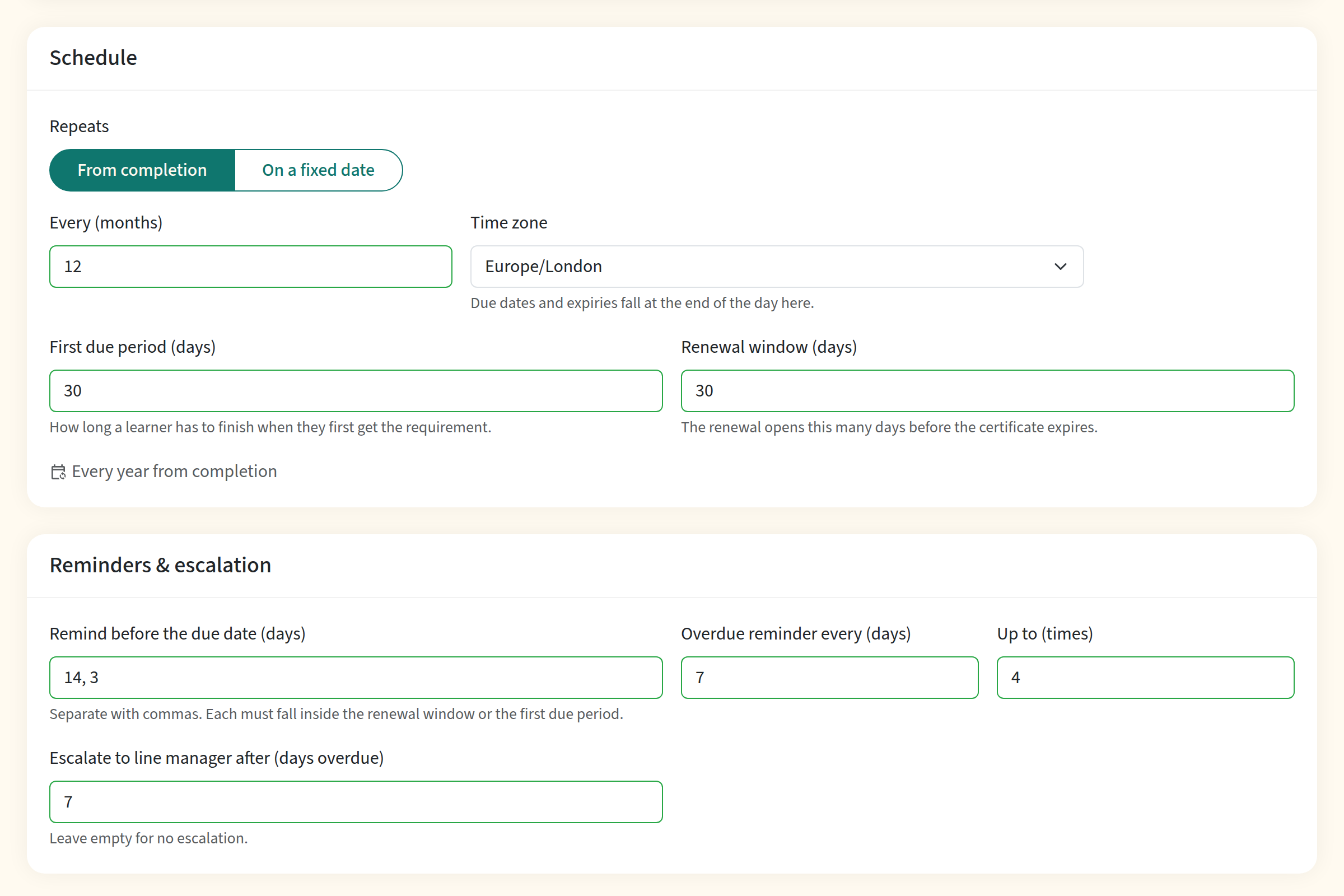
- In Schedule, choose how it repeats (see below), the Time zone (due dates and expiries fall at the end of the day in this time zone), the First due period and the Renewal window.
- In Reminders & escalation, set the reminders (see below).
- Click Save Changes. The requirement is saved as a draft.
How it repeats
| Option | What it does |
|---|---|
| From completion | The certification lasts for the number of months you choose, counted from the day the learner completes. Complete on 14 March with a 12-month interval and it expires on 14 March next year. |
| On a fixed date | Everyone expires on the same day each year (or every 2, 3, 4 or 5 years): you choose the Day and Month. This suits membership years and annual deadlines. |
For a fixed date, the Minimum active period (in months) protects learners who complete shortly before the date. A completion that close to the fixed date counts towards the next one instead, so nobody has to renew twice in a few weeks. 29 February falls on 28 February in years without one.
First due period and renewal window
- First due period (days) is how long a learner has to finish when they first get the requirement. Learners who already completed the course before you activated the requirement are carried over as compliant (see Existing completions).
- Renewal window (days) is how long before the expiry date the renewal opens. The renewal opens that many days before the expiry, but never before the halfway point of the certification, so a learner is never asked to renew almost straight away. Continuum refuses windows that are too long for the interval.
Reminders and escalation
The defaults are a sensible starting point: remind 14 and 3 days before the due date, send an overdue reminder every 7 days, up to 4 times, and escalate after 7 days overdue. Change them in Reminders & escalation.
Escalate to line manager after (days overdue) only appears when line managers are switched on for your team. See Line managers.
Preview the impact, then activate
On the requirement's page, click Run preview. Continuum works out, without changing anything:
- how many learners are in the audience,
- how many would be newly enrolled,
- how many are already compliant,
- how many would have progress reset,
- how many emails would go out.
You can download the list as a CSV to check who is affected. If you change the requirement afterwards, run the preview again.

When you are happy, click Activate. The numbers are a forecast: the real run decides again for each learner at the moment it reaches them, so a few figures can differ if someone made progress in between. Activation happens in the background in batches, so on a big team it can take a while. Mail is released gradually rather than all at once.
What learners see and receive
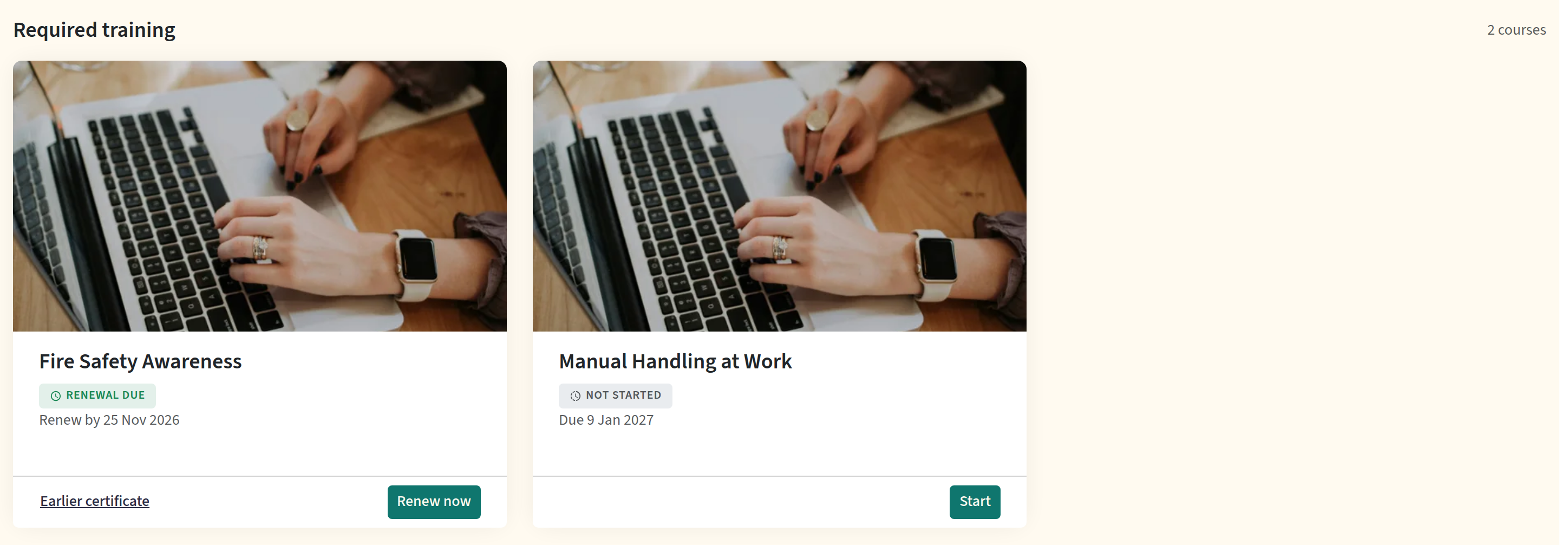
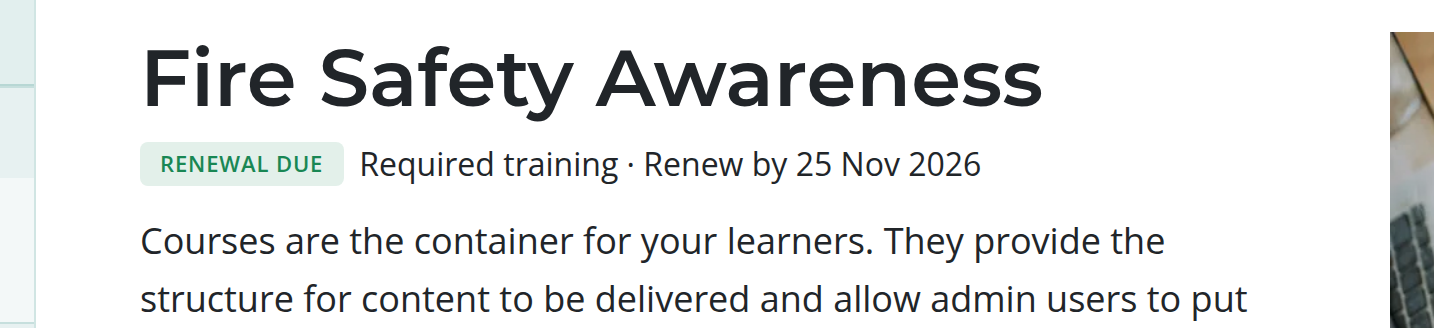
On their dashboard, a Required training section appears first, with each requirement's status (Not started, In progress, Due soon, Overdue, Renewal due, Compliant, Expired, Extended or Exempt) and its date. The course page carries a one-line reminder, and the results page shows their history of cycles.
By email, learners get:
| When | |
|---|---|
| Training required | They are first given the requirement. |
| Reminder: due on a date | The days before the due date that you chose. |
| Overdue | After the due date, repeated on your schedule up to your maximum. |
| Time to renew | The renewal opens. |
| Certification expired | The certification has run out without a renewal. |
| Certificate ready | A cycle was completed by sign-off or by an administrator and the certificate is now available. |
| A request from their line manager | A manager chased them from My team. |
Reminders are sent at 08:00 in the requirement's time zone, never in the middle of the night. When someone is late to a state, for example a renewal that opens after the due date had already passed, Continuum sends one email that covers it, not a string of catch-up emails. Reminders for a course also replace the generic course-incomplete reminders for learners on a requirement.
When a learner completes a cycle they receive the normal course-completed email once per cycle, with a link to that cycle's certificate.
Renewals
When a renewal opens, Continuum creates the next cycle and resets the learner's progress for the course. Specifically:
- Their earlier progress, quiz attempts, survey answers and feedback are archived, not deleted. They stay in reports as history, and the admin drawer lists the archive.
- The course starts again from zero, and the quiz, survey and feedback are asked again each cycle.
- Assessor sign-off is required again each cycle if the course uses it.
- Drip schedules are not restarted. Content that was unlocked for the learner stays unlocked.
- The renewal due date is the old expiry date. If the renewal opens late (for example, the requirement was paused), the learner gets a fresh due date so they are never born overdue.
Renewing early
If a learner renews before their expiry date, the next expiry runs from the date they actually completed. Renew 30 days early with a rolling interval and the anniversary moves 30 days earlier. If you need the date to stay put, use On a fixed date.
The compliance matrix
Go to Manage > Compliance and choose a requirement. You see:
- tiles for the share compliant, due soon, overdue, expired, extended and any failed emails,
- a table of learners with their status, cycle, due date, completion date and expiry date,
- filters by status and a search box.
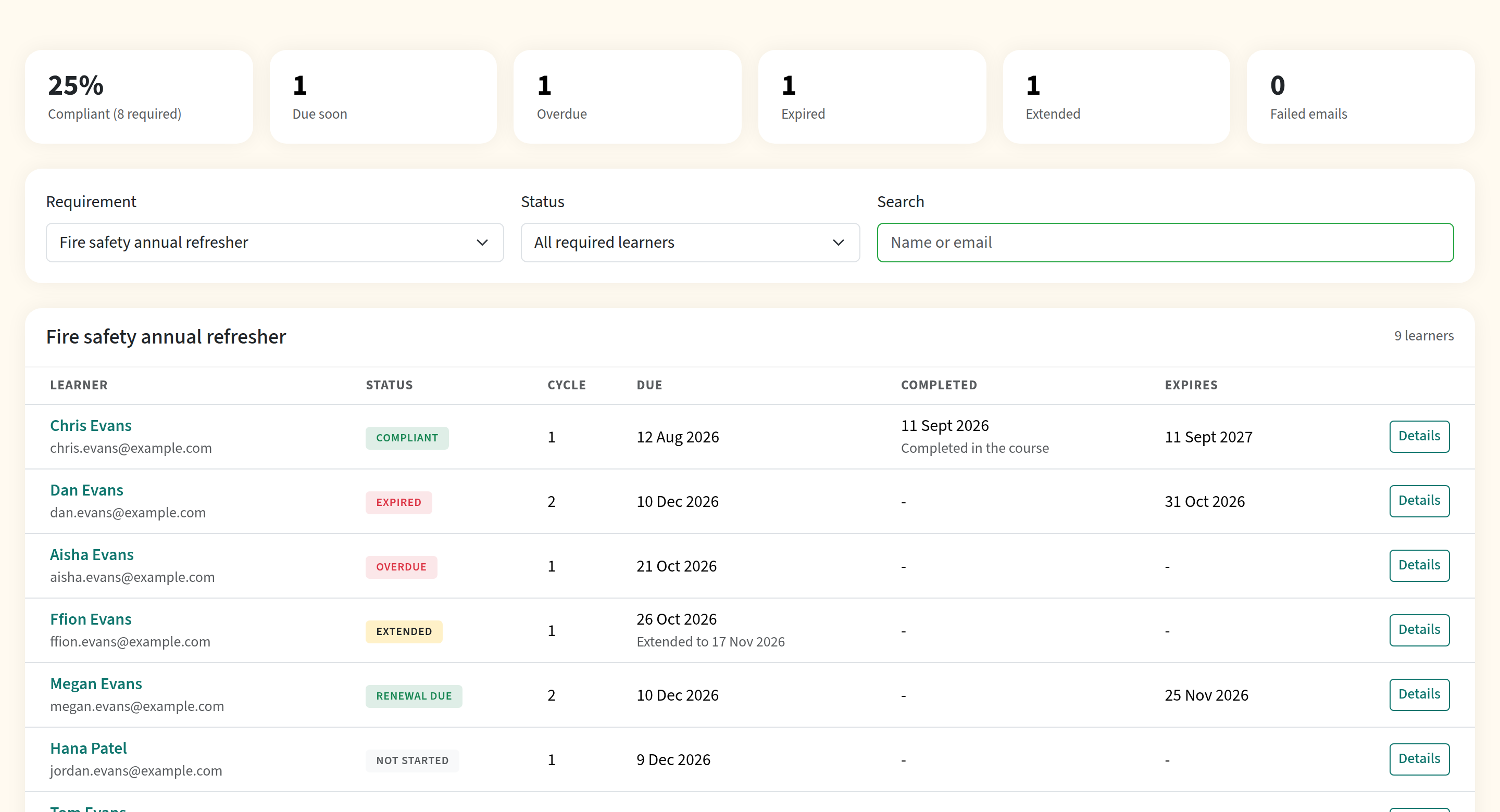
Learners who have left the audience are hidden unless you filter for them. Download CSV exports the current view with name, email, status, cycle, dates, how the completion was recorded and the certificate number.
The learner drawer
Click a learner to open their drawer. It shows every cycle with its dates, their certificates, a history of what happened and any archived progress. Every action asks for a reason and is logged with your name.
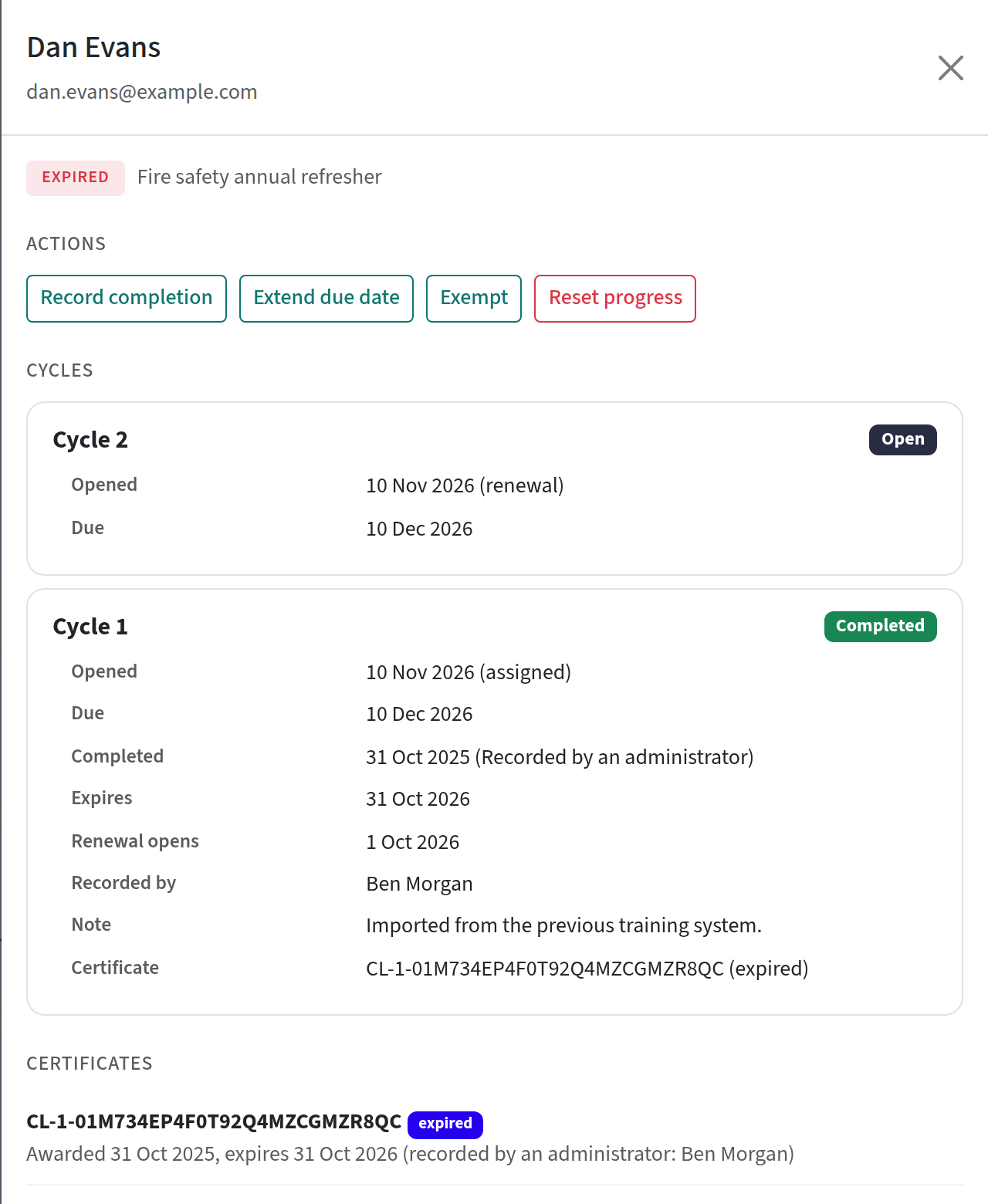
| Action | What it does |
|---|---|
| Record completion | For training done elsewhere. You enter the date and a note, and choose whether to issue a certificate. It doesn't create progress, and it doesn't satisfy sign-off. |
| Revoke recorded completion | Withdraws a recorded completion and opens a new cycle. |
| Extend due date | Gives the learner extra time on an open cycle. It changes the due date only, never the expiry date of an existing certificate. |
| Exempt | Takes the learner out of the requirement, optionally until a date. They show as Exempt and aren't chased. Remove exemption puts them back. |
| Reset progress | Archives the learner's progress so they start the course again. |
Certificates
Each completed cycle gets its own certificate, numbered in sequence, with the expiry date printed in the requirement's time zone. The new certificate supersedes the previous one, and certificate webhooks and credential signing fire for every cycle. A certificate issued from a recorded completion is labelled as recorded by an administrator.
If a course has no requirement, an administrator's reset keeps the learner's existing certificate and finishing the course again doesn't issue another. If you want a fresh one, use Re-issue from the reporting or programme page.
Existing completions
When you activate a requirement, learners who have already completed the course are carried over rather than being made to start again. Their completion date comes from the best evidence available (the completion record, then the progress record, then sign-off, then the certificate), and their expiry comes from their current certificate or is calculated from the rule. If they are already past the renewal point, the renewal opens straight away with a single catch-up email. A learner with no evidence of completion is treated as not having completed.
Pause a requirement
On an active requirement, click Pause to stop enrolments, renewals, resets and emails. Learners keep their cycles, and anyone who finishes the course is still recorded and certified. When you Unpause, renewals that fell due in the meantime open with a fresh due date and one email each.
Continuum also pauses a requirement itself, and emails the team admins once, if its course is later changed so it can't be repeated (for example you add a start date) or if the course is deleted. Fix the course, or restore it, then unpause.
Line managers
If line managers are switched on for your team:
- An admin sets each learner's manager (a team member) on the learner's page in Manage > People. A learner can also ask someone to be their manager from their account, and the manager accepts. When an admin sets a manager, both the manager and the learner are emailed. A learner can't change a manager the admin set.
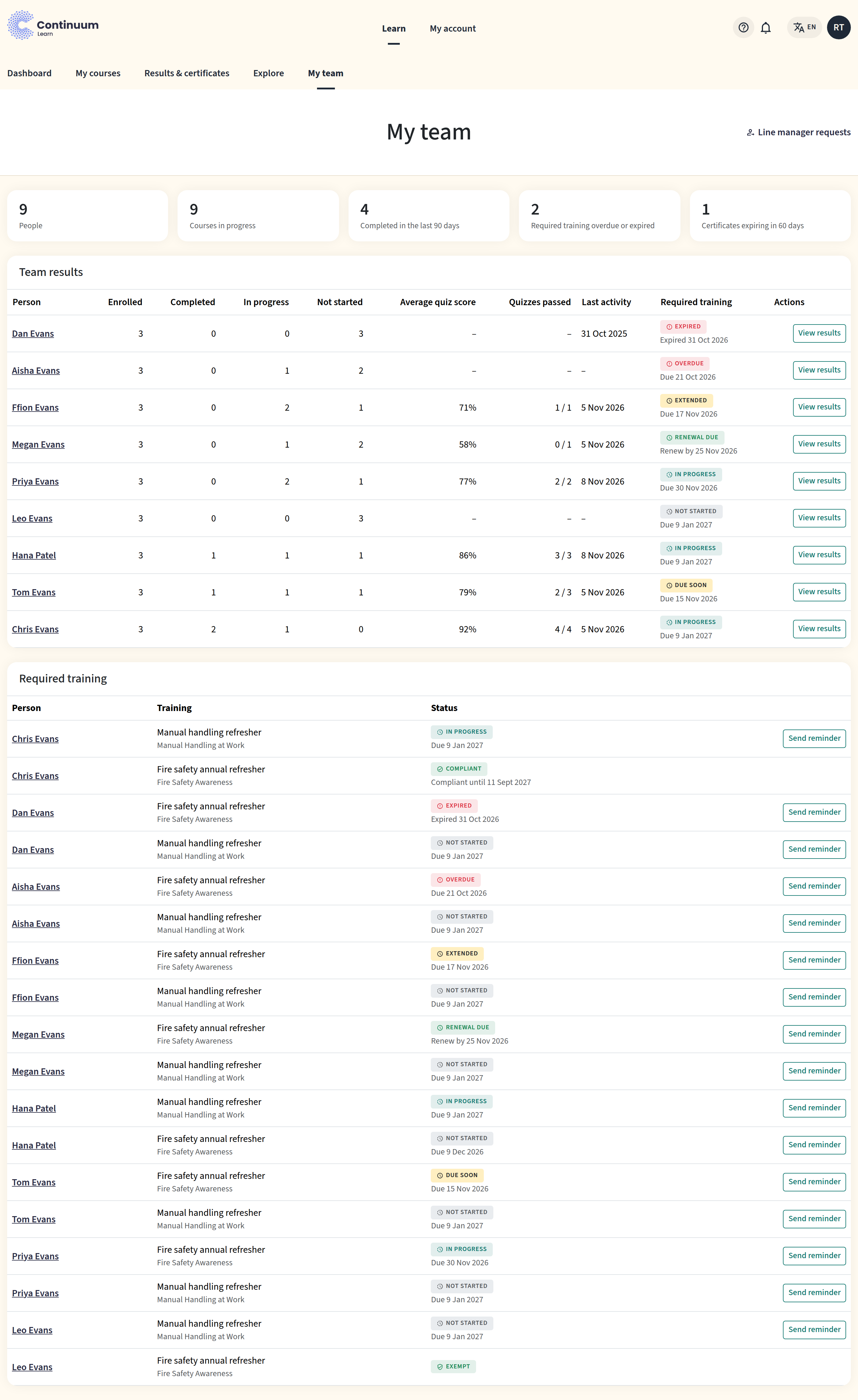
- Managers get My team in the learner area. It opens with a summary (people, courses in progress, courses completed in the last 90 days, overdue or expired required training, certificates expiring soon) and a Team results table with one row per report, which you can sort by any column. Below it is a read-only view of their reports' requirement statuses, with a Send reminder button (one reminder per report per requirement per day).
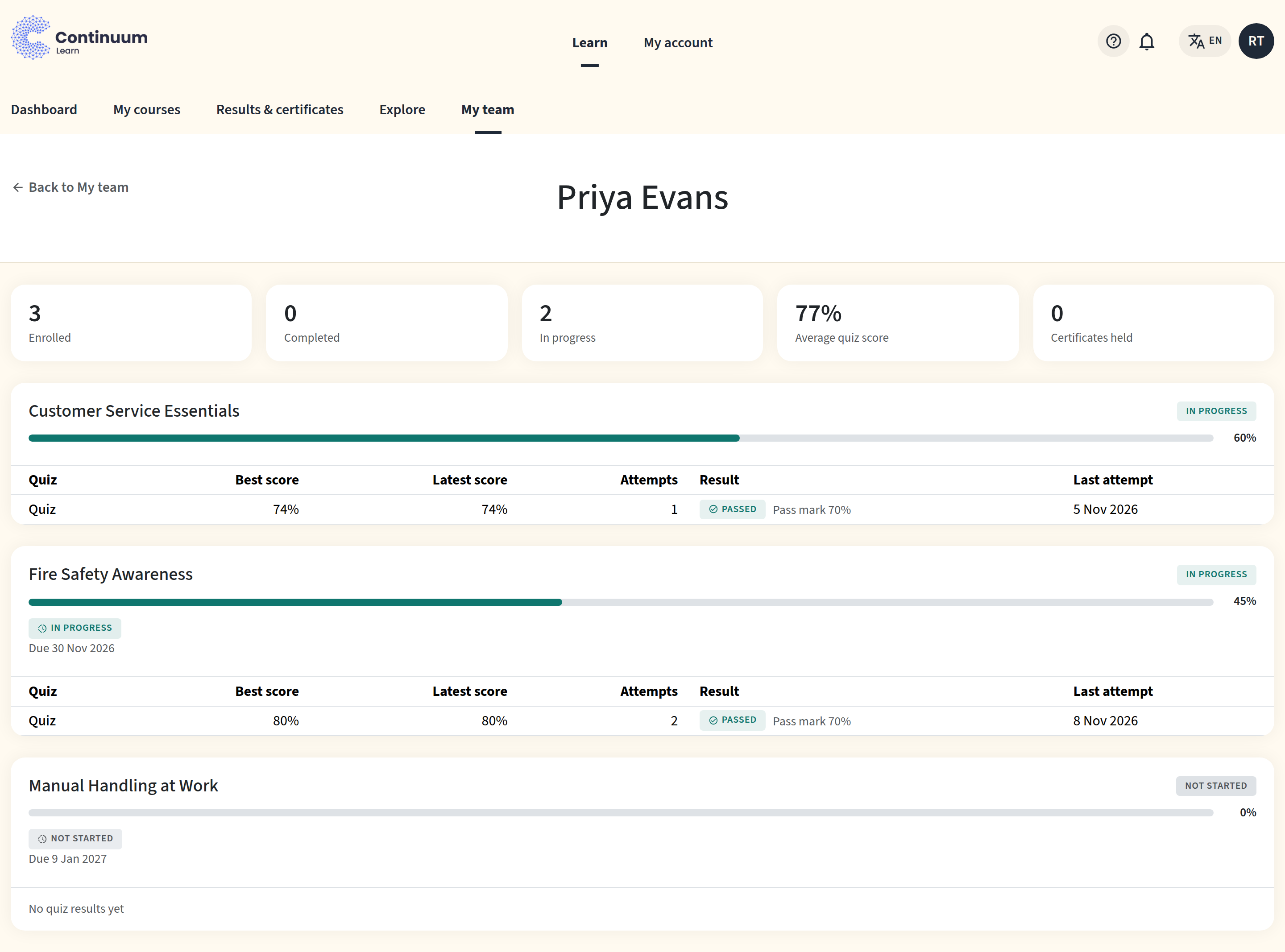
- Select a report's name, or View results, to see all of their enrolled courses (not only required ones): progress, completion dates, certificates (which you can download) and quiz scores, including their best and latest score and whether they passed. Managers can't see survey or feedback answers, quiz answers, email addresses or profile fields.
- If a learner is overdue by your escalate after number of days, their manager gets one email per cycle, after the learner's own first overdue email.
Line manager relationships are per team. A manager only ever sees reports in the team where the relationship was set.
Send your line managers the My team guide. It walks them through the page, opening one person's results, sending reminders and accepting a learner's request.
Delete a requirement
Deleting a requirement removes everyone from it, cancels open cycles and stops all emails. History, completions and certificates stay. Learners who haven't started the current cycle lose the required enrolment; learners who have started keep their access.
If a course is deleted, its requirement is paused. Restoring the course lets you unpause it.
Frequently asked questions
Can a learner unenrol from a required course?
No. Self-unenrolment, an administrator's removal and the API all refuse, saying the course is required. Exempt the learner or take them out of the audience instead.
Does a required learner use up a place on a limited course?
Required enrolments ignore the course's places limit, but they still count towards the places taken.
What happens to learners who join the audience later?
They are enrolled automatically and get a first due date of your First due period from when they joined. If you have set the requirement up for groups, adding someone to a group is enough.
Why did a learner not get a reminder?
Check that the requirement is active and not paused, the learner isn't exempt, and the learner is still in the audience. Reminders also skip dates that have already passed: a learner who joins late gets the one reminder that still applies.
Can I change the schedule after learners have started?
Yes. Changes to the interval, window and reminders apply from the next completion. The course itself can't be changed.
Can I use a different course for the renewal?
Not yet. A renewal is the same course. To replace the course, create a new requirement for the new one.
Are webhooks and the API affected?
Yes. course.completed and certificate.issued now fire once per cycle, and API progress shows the current cycle. See the developer documentation.