
One site for your primary care training hub
Sessions and Zoom with attendance, induction programmes, annual compliance and the practice-by-practice report, all on your hub's own site rather than spread across a booking tool, a spreadsheet and someone else's account.
Fernvale is a fictional training hub with practices, PCNs, courses and results. Get your own login by email and look round as a member of practice staff.
- Your own learner login
- An admin tour of the hub's side
- Nothing to install
A learning platform built around how training hubs work
A primary care training hub runs sessions, induction programmes and mandatory training for staff across many practices and PCNs. Continuum Learn puts all of it on the hub's own site: staff book and join sessions, complete their training and download certificates, practice managers see their own team, and the hub reports by practice and PCN without rebuilding spreadsheets.
Many hubs take bookings in one place, run webinars in another and keep training records in a third, so every report starts with copying and pasting. In Continuum Learn the same record covers a booked face-to-face session, a Zoom webinar with attendance taken from Zoom, an e-learning course and an annual requirement such as infection prevention and control.
Staff answer a few questions when they join, such as their role, practice and PCN, so every report and download can be filtered by them. Practice managers can be given their own view of their team's progress and required training, with a button to send a reminder, so the hub no longer chases each practice. See how the compliance training matrix and programme certificates work.
Already running the learning platform for a primary care training hub in the Midlands
Look inside the demo hub
Screens from Fernvale, our fictional demo hub. Every person, practice and result in them is invented.
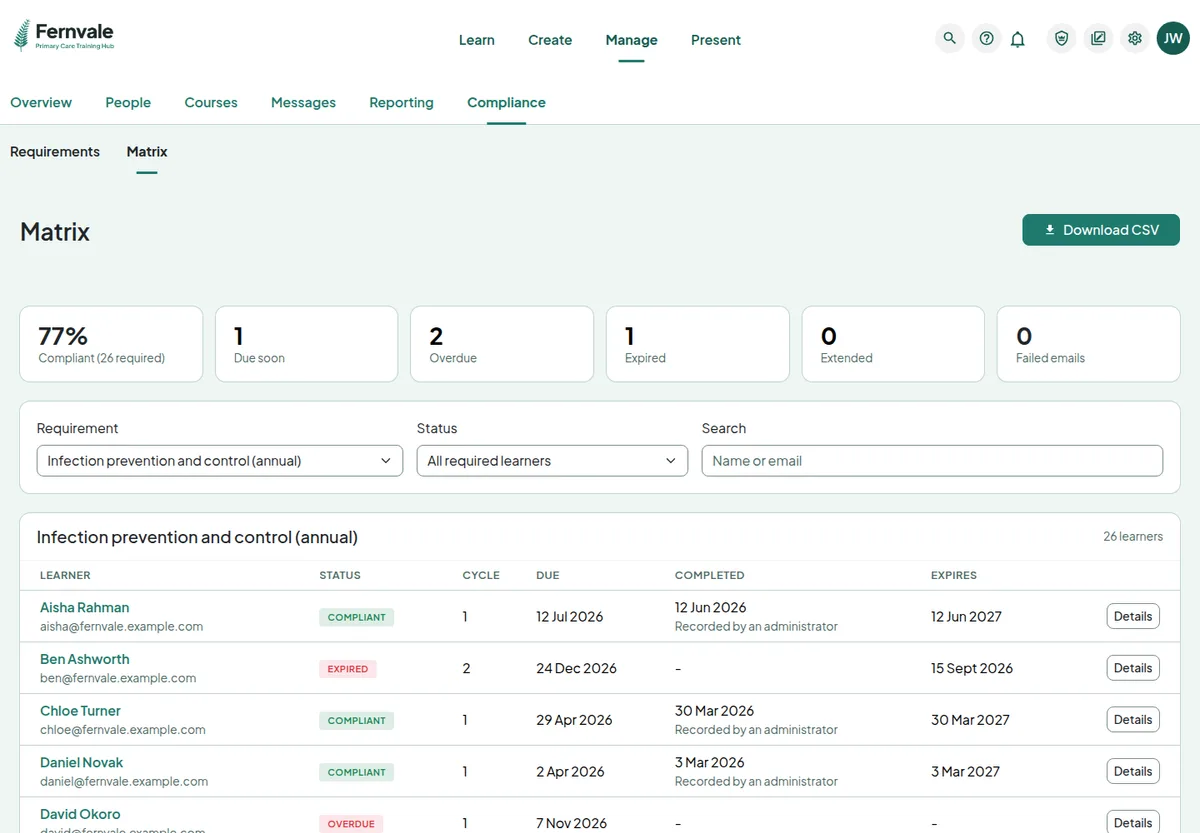
Annual compliance for every practice
Set a requirement once, such as infection prevention and control every 12 months, and see who is compliant, due soon, overdue or expired across the whole hub. Reminders and renewals run on their own, and the matrix downloads as a CSV.
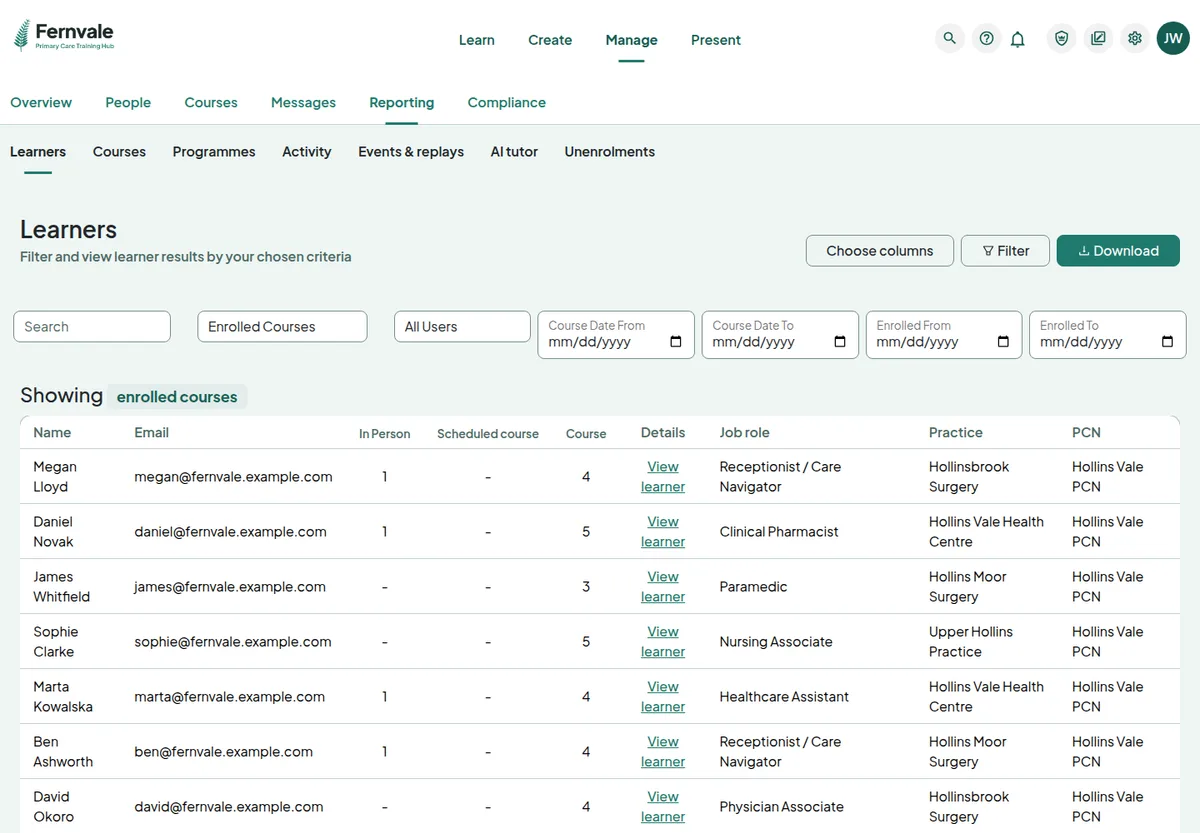
Reporting by practice and PCN
Role, practice and PCN are answered at sign-up, so the learner report can show them as columns and filter by them. Download any view for a commissioner or a practice.
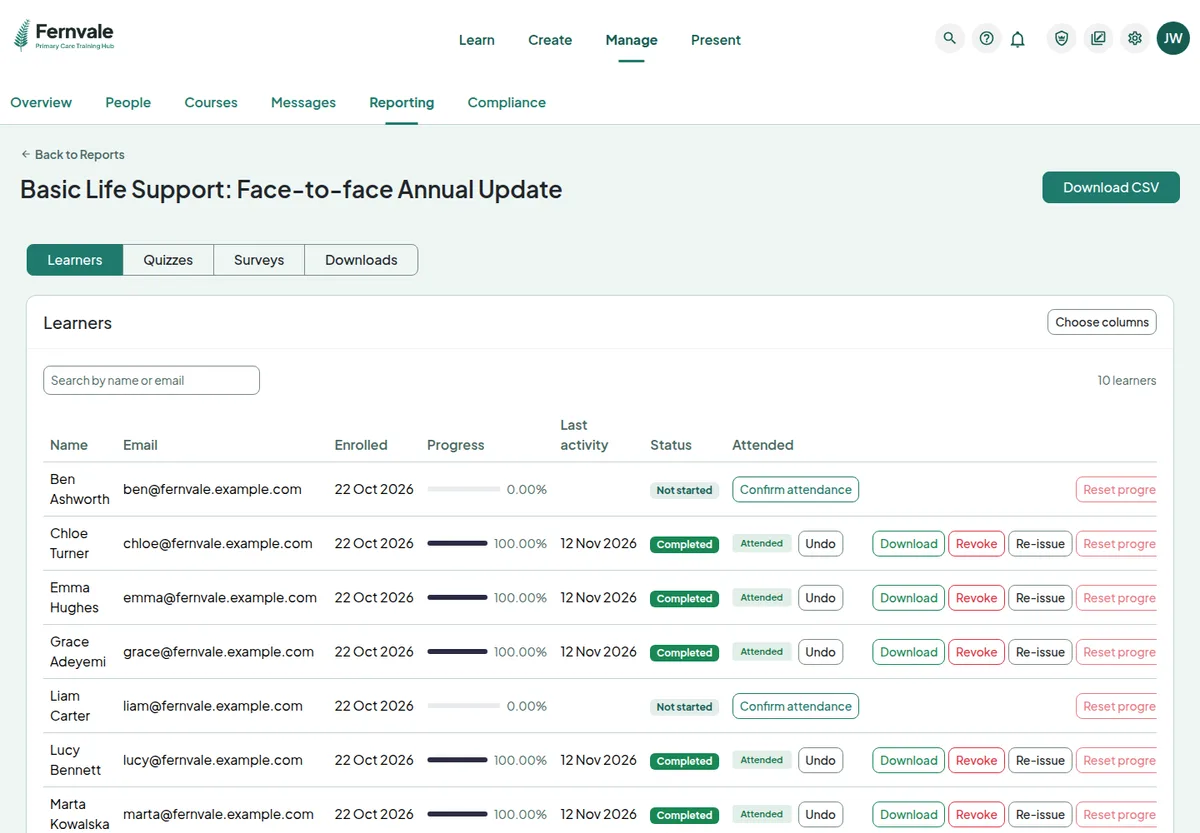
Face-to-face sessions with attendance
Book staff onto a dated session, confirm who came on the day, and the certificate goes to those who attended. Zoom sessions record attendance from Zoom itself.
What changes for the hub team
The jobs that usually take a spreadsheet, a booking tool and a lot of email.
Sessions in one place
Face-to-face sessions, Zoom webinars and e-learning in one catalogue, with places, waiting lists and attendance.
Compliance that renews itself
Annual requirements reopen on schedule, remind staff before they are due and escalate when they are overdue.
Practice managers see their team
Each manager sees only their own staff's progress and required training, and can send a reminder.
Reports by practice and PCN
Filter and download by role, practice and PCN, for the hub, a practice or a commissioner.
How a hub can use it
New staff induction
A 90-day programme for people new to general practice, opened step by step, with a certificate when it is done.
Mandatory and statutory training
Infection prevention and control, safeguarding and basic life support as yearly requirements, with practice managers kept in the loop.
Clinical updates and webinars
Lunchtime Zoom sessions and evening updates, with attendance taken from Zoom and certificates for those who joined.
Conferences and protected learning time
Bookable events with limited places and a waiting list, and a report of who came from each practice.
Everything a hub needs
Included on every plan
Induction programmes
Group courses into a programme such as "New to General Practice", in a set order if you want, with one certificate at the end.
Certificates with CPD hours
Numbered certificates that show the CPD hours you set, with a page anyone can use to check one is genuine.
Zoom sessions
Create the Zoom meeting from the session, let staff join from their dashboard and take attendance from Zoom.
Training needs analysis
Run your training needs analysis as a survey on the same site and see every answer in one place.
Emails to staff
Send session announcements and reminders to everyone, a group, or the people booked on a session, from the same place.
Your hub's own site
Your name, logo and colours on your own web address, or add the course catalogue to the website you already have.
Training hubs: common questions
What is in the demo hub?
Fernvale is a fictional primary care training hub with practices, PCNs, staff, courses, sessions, an induction programme and annual compliance, all invented. You get your own learner login by email and can look round in about ten minutes. The admin tour shows the hub team's side, and we are happy to walk you through it on a call.
Can practice managers see only their own staff?
Yes. A practice manager is linked to their staff and sees their progress, required training and certificates, with a button to send a reminder. They do not see other practices.
Can we keep our current website?
Yes. You can keep your website and add your course catalogue to it, link to your Continuum site for bookings, or move everything across. Your Continuum site uses your name, logo and colours on your own web address.
How do staff sign in?
With their own email address and a password, or through single sign-on with Microsoft Entra ID or Google Workspace if your organisation uses it. Staff can register themselves, or you can invite them or approve each registration.
How long does it take to set up?
A portal like the demo, with your own courses and branding, typically takes about a week. Existing courses can be imported, including SCORM packages.
How much does it cost?
Plans start at £49 a month for up to 50 active learners, with every feature included, and you are billed on staff who actually sign in, not every name on your list. For a hub, we agree a price based on how many staff you expect to use it; see pricing or book a call.
See it as your staff would
Get your own login to the Fernvale demo hub, or book a 20-minute call to see the admin side with someone talking it through.